Pools Create
To create a pool, navigate to ZFS -> Pools and then click the + CREATE POOL
button on the main pools page to bring up the pool configuration page:
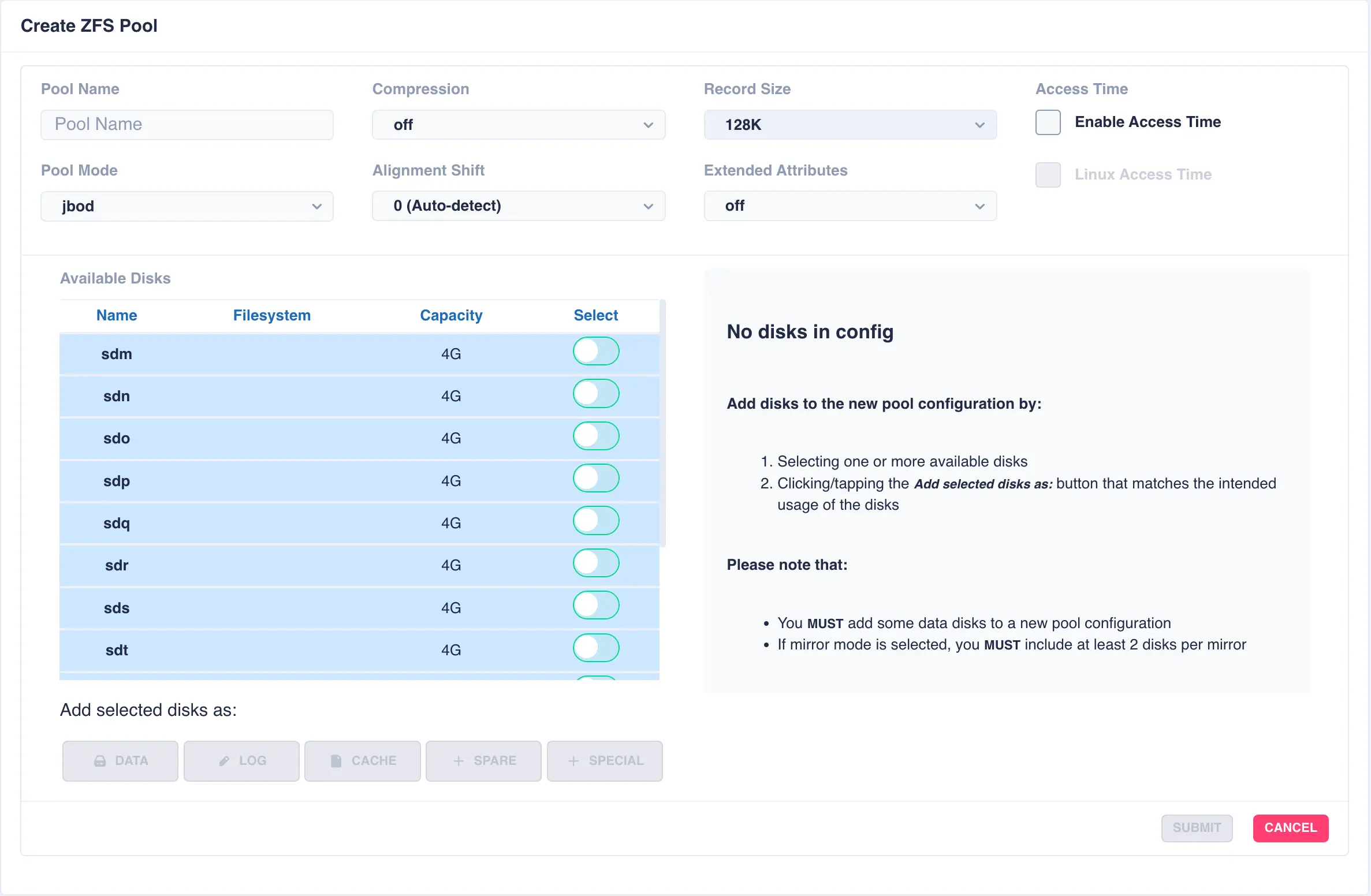
Fill out the Pool name field and select the desired structure of the pool from the Pool Mode list.
The cluster supports three types of layout when creating vdevs for a pool:
| Layout | Description |
|---|---|
mirror |
Each drive in the vdev will be mirrored to another drive in the same vdev. Vdevs can then be striped together to build up a mirrored pool. |
raidz1 |
One drive is used as a parity drive, meaning one drive can be lost in the vdev without impacting the pool. When striping raidz1 vdevs together each vdev can survive the loss of one of its members. |
raidz2 |
Two of the drives are used as parity drives, meaning up to two drives can be lost in the vdev without impacting the pool. When striping raidz2 vdevs together each vdev can survive the loss of two of its members. |
raidz3 |
Three of the drives are used as parity drives, meaning up to three drives can be lost in the vdev without impacting the pool. When striping raidz3 vdevs together each vdev can survive the loss of three of its members. |
jbod |
Creates a simple pool of striped disks with no redundancy. |
draid1 |
One drive is used as a parity drive, meaning one drive can be lost in the vdev without impacting the pool. When striping draid1 vdevs together each vdev can survive the loss of one of its members. |
draid2 |
Two of the drives are used as parity drives, meaning up to two drives can be lost in the vdev without impacting the pool. When striping draid2 vdevs together each vdev can survive the loss of two of its members. |
draid3 |
Three of the drives are used as parity drives, meaning up to three drives can be lost in the vdev without impacting the pool. When striping draid3 vdevs together each vdev can survive the loss of three of its members. |
dRAID (distributed raid) and RAIDZ are two different vdev layouts in ZFS, each offering distinct approaches to data redundancy and fault tolerance. RAIDZ is a traditional RAID-like structure that distributes data and parity information across multiple disks, while dRAID distributes hot spare space throughout the vdev, enabling faster rebuild times after drive failures.
Configure options according to your requirements - for a more in-depth discussion on options please see the HAC ZFS Tuning Guide:
Option |
Description |
|---|---|
Compression |
Compress data before it is written out to disk, choose either no compression, lz4 or zstd (on is an alias for lz4) |
Record Size |
The recordsize property gives the maximum size of a logical block in a ZFS dataset. Unlike many other file systems, ZFS has a variable record size, meaning files are stored as either a single block of varying sizes, or multiple blocks of recordsize blocks. |
Access Time |
Updated the access time of a file every time it is read or written. Recommended setting is off for better performance. |
Linux Access Time |
Hybrid setting meaning the access time is only updated if the mtime or ctime value changes or the access time has not been updated for 24 hours (on next file access). |
Alignment Shift |
Set to the sector size of the underlying disk - typically this is the value 12 for 4K drives (note some drives report a 512 byte sector size for backwards compatibility, but are in reality 4K; if unsure check manufacturers specifications) |
Extended Attributes |
This property defines how ZFS will handle Linux' eXtended ATTRibutes in a file system. The recommended setting is sa meaning the attributes are stored directly in the inodes, resulting in less IO requests when extended attributes are in use. For a file system with many small files this can have a significant performance improvement. |